GALLERY
This is the "community" function of Comixware, where you can access
and view a gallery of movies posted by Comixware users from all over the world.
This is also where you post and manage your own movies and share them with friends
and family everywhere.
Gallery List
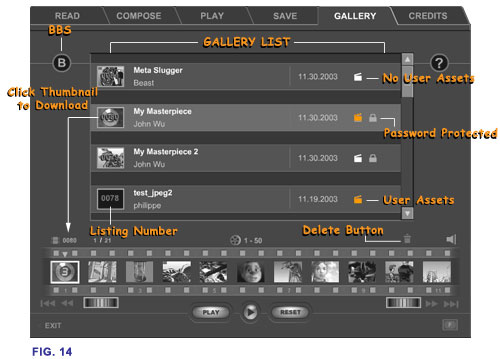
The Gallery pieces are listed chronologically in a scrollable window
with the latest posting at the top. The listing numbers (on top of
thumbnails) reflect such descending order, e.g., 20, 19, 18, 17, and
so on. Each listing includes: a thumbnail of the movie (with listing
number on top), title of the movie, author's name, the posted date
and a "clapboard" symbol indicating whether the piece contains
third party "user" assets. A white clapboard means NO, and
an orange clapboard means YES. If the piece is password protected
there is an additional "lock" symbol present next to the
"clapboard". Otherwise there is no "lock" symbol
on the listing.
Clicking
on the thumbnail of a listing will have the piece 'selected' in the
list and started downloading that movie to your local Timeline. Once
downloaded, the listing number and the length of the movie will appear
on the top of the Timeline (at far left next to a "movie clip"
symbol). The movie's music track will also be reflected on the color
of the 'sound' symbol.
If a
movie is password protected, when you click on its thumbnail a password
screen will come up asking you to enter the movie's password in order
to gain access. If you know the password, enter it and the movie will
start downloading into your Timeline. If you don't enter the correct
password, you can't access that movie and no download occurs. A password
protected movie is indicated by a "lock" symbol
on the listing. That means the author of the movie wants the piece
to be "private" for the eyes of intended audience only.
If this is someone you know you may request the password by sending
the author an e-mail from within Comixware. Simply click on author's
name to go to the e-mail screen (see paragraph below).
You can
do anything with the downloaded piece as you normally do to a movie:
you can play it, compose it, save it and/or re-post it to the Gallery.
(But please do not re-post other people's work without making significant
modifications.) There is also an e-mail client for you to communicate
with authors of those Gallery movies. Simply click on the "author"
name of a listing to bring up the messaging screen for e-mail. Note
that you don't see the actual e-mail address but the author's name
appeared in the "Mail to" field. This is not a problem for
mailing. The author's e-mail address is simply being "masked"
for privacy
and security consideration. Unless you want to send message
to a different person (in which case simply replace author's name
with an e-mail address), leave the author name unchanged and your
message will get to the correct recipient. In addition, a bulletin
board service is linked to the Gallery (the circled letter 'B' button)
to facilitate further communication among Comixware users. The Gallery
is a great way to display your work as well as to communicate with
other users. Use it wisely and courteously.
Gallery
Service - Please note that Gallery is provided by
Yi.magination as a courtesy to all Comixware users. Your access and
use of Gallery services are privilege not guaranteed right. Yi.magination
reserves and retains all rights to this proprietary forum including
its format, contents and movie data posted by users. From time to
time we would archive or delete older Gallery items from our server.
Please make sure you save a copy of your movie before posting it to
Gallery.
 Introduction
| Read |
Compose |
Play |
Save | Gallery
Introduction
| Read |
Compose |
Play |
Save | Gallery

