SAVE
When user can create any length of movie with endless re-edit-ability
and unrestricted asset options, the Save function becomes crucial
to the usability and extensibility of Comixware. The 3 main features
under the Save section are: Save
Movie, Recall
movie, and Post
Movie.
Save
Movie
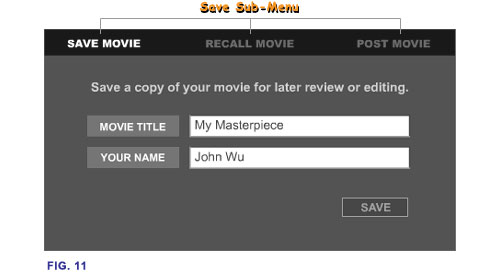
You can
save a copy of the current movie from the timeline to your hard disk
for later re-viewing, re-editing and/or for archiving purposes. Enter
a title and an author name for your movie and click "SAVE"
button. If your movie has the same name as a movie already on file,
an alert screen will come up. You may either choose 'SAVE' to overwrite
the existing file or 'CANCEL' to go back to 'Save Movie' screen to
retype a new name for the movie. The movies are saved to a chronological
list where they are displayed item by item with their titles, length
(in scenes) and saved date. There is no limit on the number of movies
you can save to this list.
Note:
The character "&" is reserved for programming
purpose. Any such character found in a movie's name will be replaced
by a "_" (under score) character.
Save Movie with Third Party Assets
If a
movie you are saving contains third party linked assets, a "Third
Party Assets" alert screen will come up. This screen lists all
linked "Third Party" assets associated with this movie and
asks if you want them to be imported from your computer's temporary
Internet cache to your "user" folder. If you answer YES,
all linked assets will be imported into your "user" folder
and saved with your movie. So that next time when you recall this
movie, all linked assets will be "locally" available for
playing and editing. If you answer NO, these assets will not be imported
to your "user" folder and your movie will be saved without
them. Next time when you recall this movie, a Missing
Assets alert will list them as missing assets.
 Introduction
| Read
| Compose
| Play
| Save |
Gallery
Introduction
| Read
| Compose
| Play
| Save |
Gallery

